

Calculations Details
2.6 Basic Maths
Section titled “2.6 Basic Maths”2.6.1 Add, Subtract, Multiply, Divide
Section titled “2.6.1 Add, Subtract, Multiply, Divide”These functions take a list of inputs separated by commas. The syntax for the Basic Maths functions ADD, SUB, MUL and DIV is:
ADD(a, b,..., n)
SUB(a, b,..., n)
MUL(a, b,..., n)
DIV(a, b,..., n)
a, b,.. n — any valid timeseries input (see section 2.2)
The inputs are processed from right to left which means that the SUB and DIV functions will return different results depending on the order of the inputs:
DIV(10, 8) = 1.25
DIV(8, 10) = 0.8
2.6.2 Percent Deviation
Section titled “2.6.2 Percent Deviation”This function returns the percent deviation of input b from input a. The syntax for the PERCENTDEV function is:
PERCENTDEV(a, b)It is evaluated as 100 *(a-b)/b. For example:
PERCENTDEV(10, 8) = 25
PERCENTDEV(8, 10) = -20
2.7 Totalisers
Section titled “2.7 Totalisers”The Totalise functions integrate the area under a trend over the specified window and starting at a specified time. For example, totalising a flow will return the total volume since the start of the window.
The TOTALISE function is the original integral function and has since been superseded by the (backwards compatible) TOTALISE2 function, which is more advanced and better at handling calendar time intervals and daylight savings time.
At some point the TOTALISE algorithm will be replaced by the TOTALISE2 code but any calculations will continue to work.
2.7.1 TOTALISE
Section titled “2.7.1 TOTALISE”The TOTALISE calculation is probably the most used function will follow the selected interpolation mode on a trend. I.e. if the series is set to INTERPOLATED mode then the TOTALISE calculation will request interpolated points when it is being evaluated. This will result in the fastest performance but may give discrepancies vs raw data
The syntax for the TOTALISE function is:
TOTALISE(input, window, windowOffsetOrAnchor, rate)-
input — any valid timeseries input (see section 2.2)
-
window — a window size to totalise over (fixed amount of seconds/minutes/hours/days)
-
windowOffsetOrAnchor — where this window should be placed this can be specified in four ways; as a pre-defined text expression, as an offset from 00:00:00 GMT, as an expression of time or as a dynamic offset from the current time.
-
rate — time unit for underlying tag, if it is m3/s then the time unit is seconds, so you would write “1s”, if m3/h then unit is hours, so you would write “1h” (required to properly scale result)
Window Definition
Section titled “Window Definition”The Window can be defined as:
- using calendar types: DAY, MONTH, QUARTER, YEAR. These options are pre-defined in the UI
| DAY: | defaults to midnight of one day to midnight of another |
| MONTH: | defaults to midnight of first day of the month until first day of the next month |
| QUARTER: | defaults to midnight of first day of either january, april, july and October |
| YEAR: | defaults to midnight of 1st of january until begin of next year |
- an exact time definition (1s, 7d, 1mo) — see section 2.2
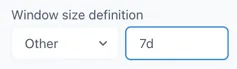
To use this or the following options select “Other” in the Window size definition dropdown:
-
by duration definition (PT1S, PT1H, PT24H)
-
by period definition (P1D, P1M, P1Y)
-
by passing millisecond value (3600000 for 1h)
windowOffsetOrAnchor definition
Section titled “windowOffsetOrAnchor definition”This defines where the start of the totalisation is placed. The options are:
-
Text expressions BEGIN_DAY, BEGIN_MONTH, BEGIN_QUARTER or BEGIN_YEAR will anchor window to the beginning of current period.
-
An offset from 00:00:00 GMT. Negative values shift the start earlier, and positive values shift it later (e.g. -02:00 to align with European summer time - CEST)
-
A fixed point in time with optionally specified timezone in the format “YYYY-MM-DD hh:mm:ss ZZZz” (e.g. 2024-04-01 00:00:00 CEST).
-
Dynamic offset: Entering a time expression results in the start time of the window being changed dynamically to [now+dynamic offset]. For example, entering ‘0’ means the window is always ending “now”. I.e. it always shows the value of the previous “window” up to now. (This is effectively the same as a SLIGINGAGG(SUM) calculation over the same “window”)
Entering “-2h” will give the total over the “window” 2 hours ago.
Examples
Section titled “Examples”calc/TOTALISE(tag, YEAR, BEGIN_YEAR, 1h)will calculate integral since beginning of current year up to current moment.
calc/TOTALISE(tag, MONTH, BEGIN_YEAR, 1h)will calculate intergral since beginning of current year, starting from 0 at beginning of each month
calc/TOTALISE(1, 1d, 00:00:00, 1h)= 24 at 23:59:59.999
calc/TOTALISE(1, DAY, BEGIN_DAY, 1d)= 1 at 23:59:59.999
calc/TOTALISE(1, QUARTER, BEGIN_QUARTER, 1d)= 90 at 2023-03-31 23:59:59.999= 91 at 2023-06-30 23:59:59.999= 92 at 2023-09-30 23:59:59.999= 92 at 2023-12-31 23:59:59.9992.7.2 TOTALISE2
Section titled “2.7.2 TOTALISE2”The TOTALISE2 function is the same as the TOTALISE function from Ingenuity back-end version ei-v6.88.0 (20th November 2025). TOTALISE2 was originally created as an improved version of the totaliser and then replace the original logic. The function name can still be used to make sure any content created with TOTALISE2 still works.
2.7.3 TOTALISE RAW
Section titled “2.7.3 TOTALISE RAW”The TOTALISERAW function is identical to the TOTALISE function except that it will force the calculation to use Raw data when it is evaluated, regardless of the Interpolation mode on the trend. This can result in slow performance if there is a lot of data, but it will be very accurate. This might be preferable if the value is to be used in a report.
2.8 Functions
Section titled “2.8 Functions”The mathematical functions give access to the common operations for analysing data and evaluating formulae. The EXP, LN and SQRT functions take the form:
fn(input)input any valid timeseries input (see section 2.2)
The LOG and POWER functions require a second input and the syntax is:
fn(input, b)input any valid timeseries input (see section 2.2)
b any valid timeseries input (see section 2.2)
2.8.1 EXP: Exponential, ex
Section titled “2.8.1 EXP: Exponential, ex”The term “exp(x)” is the same as writing ex or ℯ^x or “e to the x” or “ℯ to the power of x”. In this context, “ℯ” is a universal constant, ℯ = 2.718281828…
calc/EXP(input)Example
Section titled “Example”calc/EXP(10) = 22,026.465...2.8.2 LN: Natural Log, ln()
Section titled “2.8.2 LN: Natural Log, ln()”The Natural Log is the inverse of the Exponential function. I.e. ln(ℯx) = x. The syntax for the LN function is:
calc/LN(input)Example
Section titled “Example”calc/LN(5) = 1.609...
calc/LN(EXP(10)) = 10Important notes
Section titled “Important notes”The following should be noted:
- The ln of a negative number is undefined and will throw a “Not a Number” (NaN) error:

- ln(0) is undefined and will throw a “Not a Number” (NaN) error:

- ln(∞)= ∞

-
ln(1)=0
-
ln(e)=1
-
ln(ex) = x
-
eln(x)=x
2.8.3 SQRT: Square Root, √x
Section titled “2.8.3 SQRT: Square Root, √x”Square root of a number is a value, which on multiplication by itself, gives the original number. The square root is an inverse method of squaring a number i.e. x2. The syntax for the SQRT function is:
calc/SQRT(input)Example
Section titled “Example”calc/SQRT(16) = 42.8.4 LOG: Logarithm Logy(x)
Section titled “2.8.4 LOG: Logarithm Logy(x)”The Logarithm is the exponent or power to which a base (b) must be raised to return a given number (x).
Logb(x)
The syntax for the LOG function is:
calc/LOG(input, b)input the number for which to find the LOG - any valid timeseries input (see section 2.2)
b the base in which to calculate — any constant or valid timeseries (see section 2.2)
Example
Section titled “Example”calc/LOG(100,10) = 2
calc/LOG(8,2) = 32.8.5 POW: Power, xy
Section titled “2.8.5 POW: Power, xy”The POWER function multiplies a number (x) by itself a specified number of times (b). This is often called raising x to the power of b. It is the inverse of the LOG function
xb
The syntax for the POW function is:
calc/POW(input, b)input the number to multiply (x) - any valid timeseries input (see section 2.2)
b the power, the number of times to multiply the input by itself— any constant or valid timeseries (see section 2.2)
Example
Section titled “Example”calc/POW(10,2) = 100
calc/POW(10,-2) = 0.01
calc/POW(2,3) = 8
calc/POW(25,0.5) = 52.9 Sliding Aggregates
Section titled “2.9 Sliding Aggregates”The SlidingAggregate functions perform an aggregate operation on a single input, over a window. The general construct for SLIDINGAGG functions is:
SLIDINGAGG(input, operation, window)input — an integer or any valid timeseries source
operation — the short name for one of the operators listed below (AVG, COUNT, NUMGOOD, NUMBAD, STDDEV, VAR, MIN, MAX, SUM, DIFF)
window — any valid time input — see section 2.2
The function returns the result of the operation over the period of the window immediately preceding the current time. When trending a SLIDINGAGG function, the window is always anchored to beginning of the trend time range.
Example
Section titled “Example”SLIDINGAGG(input, AVG, window)Will return a timeseries of the average of the preceding hour at every point in time
The difference between the Sliding Aggregates and the Statistics functions is that the Statistics functions operate across the inputs at each point in time, whereas the Sliding Aggregates operate on a single tag over a window.
2.9.1 AVG: Average
Section titled “2.9.1 AVG: Average”Returns an averaged value of the input over the window. This is an extremely useful function for smoothing out noisy signals. The syntax for a sliding aggregate AVG function is:
SLIDINGAGG(input, AVG, window)2.9.2 COUNT: Count
Section titled “2.9.2 COUNT: Count”Returns the count of the number of points in the window. The syntax for a sliding aggregate COUNT function is:
SLIDINGAGG(input, COUNT, window)2.9.3 NUMBAD: Number of Bad Points
Section titled “2.9.3 NUMBAD: Number of Bad Points”Returns the count of the number of points with a “bad” status in the window. The syntax for a sliding aggregate NUMBAD function is:
SLIDINGAGG(input, NUMBAD, window)2.9.4 NUMGOOD: Number of Good Points
Section titled “2.9.4 NUMGOOD: Number of Good Points”Returns the count of the number of points with a “bad” status in the window. The syntax for a sliding aggregate NUMGOOD function is:
SLIDINGAGG(input, NUMGOOD, window)2.9.5 STDDEV: Standard Deviation
Section titled “2.9.5 STDDEV: Standard Deviation”Returns the standard deviation of the data in the window. The syntax for a sliding aggregate STDDEV function is:
SLIDINGAGG(input, STDDEV, window)2.9.6 VAR: Variance
Section titled “2.9.6 VAR: Variance”Returns the variance of the data in the window. The syntax for a sliding aggregate VAR function is:
SLIDINGAGG(input, VAR, window)2.9.7 MIN: Minimum
Section titled “2.9.7 MIN: Minimum”Returns the minimum value of the data in the window. The syntax for a sliding aggregate MIN function is:
SLIDINGAGG(input, MIN, window)2.9.8 MAX: Maximum
Section titled “2.9.8 MAX: Maximum”Returns the maximum value of the data in the window. The syntax for a sliding aggregate MAX function is:
SLIDINGAGG(input, MAX, window)2.9.9 SUM: Sum
Section titled “2.9.9 SUM: Sum”Returns the sum of all the values of the data in the window. The syntax for a sliding aggregate SUM function is:
SLIDINGAGG(input, SUM, window)2.9.10 DIFF: Difference
Section titled “2.9.10 DIFF: Difference”Returns the difference between the last and the first values of the data in the window. The syntax for a sliding aggregate DIFF function is:
SLIDINGAGG(input, DIFF, window)If the last value is lower than the first value, then the result is negative. This is very useful for calculating gradients.
2.10 Windowed Aggregates
Section titled “2.10 Windowed Aggregates”This calculation is an optimized SLIDINGAGG variant that uses historian-provided aggregates to speed up data retrieval time. Instead of calculating over a sliding window, it calculates the aggregates over consecutive fixed windows within the time period.
The syntax of the WINDOWAGG function is:
calc/WINDOWAGG(input, operation, window)input — an integer or any valid timeseries source
operation — the short name for one of the operators listed below (AVG, COUNT, , NUMBAD, STDDEV, VAR, MIN, MAX, SUM, DIFF)
window — any valid time input — see section 2.2
The available operations for WINDOWAGG are AVG, MIN, MAX, COUNT, STDDEV, VAR. The functions as the same as for the SLIDINGAG calculation.
2.11 Statistics
Section titled “2.11 Statistics”These functions take a list of inputs separated by commas and will return the result of the function across all the inputs at each point in time:
function(a,b,..,n)The order of the inputs is not important
2.11.1 MAX: Maximum
Section titled “2.11.1 MAX: Maximum”The minimum of all the inputs at each point in time. The syntax for a MAX function is:
MAX(8,7,4) = 82.11.2 MIN: Minimum
Section titled “2.11.2 MIN: Minimum”The minimum of all the inputs at each point in time. The syntax for a MIN function is:
MIN(8,7,4) = 42.11.3 MEAN: Mean
Section titled “2.11.3 MEAN: Mean”The mean of all the inputs at each point in time. The syntax for a MEAN function is:
MEAN(8,7,4) = 6.332.11.4 MEDIAN: Median
Section titled “2.11.4 MEDIAN: Median”The median of all the inputs at each point in time. The syntax for a MEDIAN function is:
MEDIAN(8,7,4) = 72.11.5 STDDEV: Standard Deviation
Section titled “2.11.5 STDDEV: Standard Deviation”The standard deviate of all the inputs at each point in time. The syntax for a STDDEV function is:
STDDEV(8,6,4) = 22.11.6 VARIANCE: Variance
Section titled “2.11.6 VARIANCE: Variance”The standard deviate of all the inputs at each point in time. The syntax for a VARIANCE function is:
VARIANCE(8,6,4) = 42.12 Logical
Section titled “2.12 Logical”The Logical functions allow the user to change the data that is returned depending on if a certain condition is true. They do not apply any mathematical operations on the data.
2.12.1 IFTAGEXISTS: If Tag Exists
Section titled “2.12.1 IFTAGEXISTS: If Tag Exists”This function prevents errors where a valid timeseries does not exist. If a valid dataset is returned then it is returned by the function, otherwise the specified response is provided. The syntax for an IFTAGEXISTS function is:
IFTAGEXISTS(a, ifFalse)a — a constant or timeseries source to check and return if valid — see section 2.2
ifFalse — a constant or any valid timeseries source to return if (a) is invalid — see section 2.2
2.12.2 IFEQUALS: If Equals
Section titled “2.12.2 IFEQUALS: If Equals”This function compares two inputs (a & b) and returns one timeseries if the result is true (to within the specified precision), otherwise it returns an alternative timeseries. The syntax for an IFEQUALS function is:
IFEQUALS(a, b, ifTrue, ifFalse, <precision>)
a — a constant or any valid timeseries source — see section 2.2
b — a constant or any valid timeseries source — see section 2.2
ifTrue — a constant or any valid timeseries source — see section 2.2
ifFalse — a constant or any valid timeseries source — see section 2.2
precision — OPTIONAL a number specifying the tolerance as either an absolute value or a % tolerance of the average of a & b to apply to the IFEQUALS test. Default = 0.01%.
In order to keep it simple and make sure that the order of the numbers is not important, the precision is calculated as:
Precision absolute abs\|(a-b)\|
Precision percent abs\|(a-b)/((a+b)/2)\|\*100
i.e. the percentage is the deviation from the average of the two numbers.
2.12.3 THRESHOLD
Section titled “2.12.3 THRESHOLD”This function compares two inputs (a & b) and returns one timeseries a is equal or greater than b, and a different one if it is lower. The syntax for a THRESHOLD function is:
THRESHOLD(a, b, ifaboveorequal, ifbelow)Example
Section titled “Example”calc/THRESHOLD(100,50,1,0) = 0
calc/THRESHOLD(100,100,1,0) = 1
calc/THRESHOLD(100,80,1,20) = 20
calc/THRESHOLD(80,100,1,20) = 1Use cases
Section titled “Use cases”Flow masking — return the value of a flowmeter if a valve is open, otherwise return zero. This is useful where a flowmeter does not read exactly zero when there is no flow.
calc/THRESHOLD(ValveStatus,1,FlowReading,0)Masking out the periods above or below ‘Threshold’.
The function can be used as the filter so the time-series data has ‘gaps’ instead of specific value when the input is above or below the threshold. The following example shows the use case of falling edge detection. When ValveStatus goes from 1 to 0 the function outputs the value = 1 points when the transaction occurs.
calc/THRESHOLD(ValveStatus,1,constants/empty,1)2.12.4 TIME_THRESHOLD
Section titled “2.12.4 TIME_THRESHOLD”This function combines the timeseries of two inputs ‘before_tag’ and ‘after_tag’ at the time point specified by ‘timestamp’. The syntax is as follows:
calc/TIME_THRESHOLD(timestamp, before_tag, after_tag)Use cases
Section titled “Use cases”A well designation was changed from producer to injector and a new historian tag was introduced to record wellhead pressure for the new well id. User wishes to visualize the wellhead pressure from the wellbore point of view. To achieve this the two tags can be joined at the point where the designation change occurred.
calc/TIME_THRESHOLD('1-Jan-2022 05:00:00', A21P_WHP, A21I_WHP)2.13 Series Conditioning
Section titled “2.13 Series Conditioning”The Series Conditioning functions are used to corrector condition the source data so that it displays correctly in downstream functions.
2.13.1 STEPPED
Section titled “2.13.1 STEPPED”The Stepped function forces the interpolation algorithm to hold the previous value until a new value is seen. This is essential in the following cases:
-
Sparse data that applies for periods of time, for example forecasts; there may be one value per month and it applies for the whole month.
-
Binary or discrete data that has not been flagged as stepped in the underlying source*. For example 0 or 1 values, motor running/stopped signals etc. The motor cannot have a state between running and stopped.
* This is a parameters supported by industry standard data historians that identifies a tag as discreet (Boolean, Digital, on/off etc.)
The syntax for a STEPPED function is:
STEPPED(a)a — any valid timeseries source — see section 2.2
Example
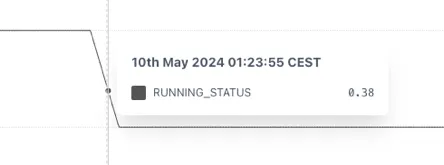
Section titled “Example”The example below shows that without using the STEPPED function the RUNNING_STATUS shows an implausible value of 0.38 when trended because the underlying tag is not properly configured in the source.
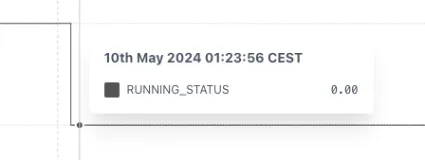
This can be fixed by wrapping the tag in a STEPPED function. Now the change in state properly shown.
2.13.2 STEPPEDRAW: Stepped Raw
Section titled “2.13.2 STEPPEDRAW: Stepped Raw”The STEPPEDRAW function is identical to the STEPPED function other than it forces the use of Raw data, even if the Trend is set to Interpolated mode.
This is especially useful for reports where one needs to return an accurate total.
Use case
Section titled “Use case”Forcing a TOTALISE calculation to correctly sum a forecast over a month. If the forecast has the following data:
| Month | Rate | Monthly Vol. |
|---|---|---|
| 01-Jan 00:00 | 1 m3/d | 31 m3 |
| 01-Feb 00:00 | 0 m3/d | 0 m3 |
If the Forecast rate is totalised for January without forcing the data to be stepped, then the totalizer will interpolate between 1 and 0 over January and the result will be:
TOTALISE(Rate, MONTH, BEGIN_MONTH, 1d) = 15.5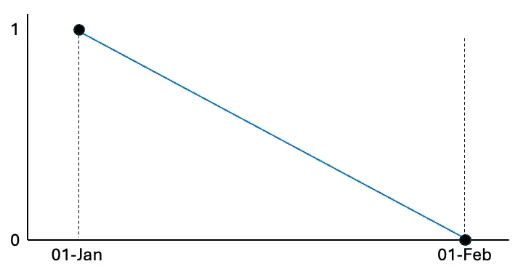
If the Rate is wrapped in a STEPPEDRAW tag it will force the calculation to step the underlying data and the result will be correct.
TOTALISE(STEPPEDRAW(Rate), MONTH, BEGIN_MONTH, 1d) = 31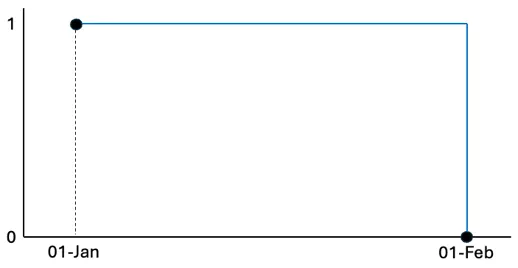
2.13.3 NOBAD: No BAD
Section titled “2.13.3 NOBAD: No BAD”The No Bad function removes points from the timeseries that have a “Bad” quality according to the OPC standard[^2] (possible options are Good, Uncertain or Bad) in Raw mode only.
The syntax for a NOBAD function is:
NOBAD(a)a — any valid timeseries source — see section 2.2
This function has very limited use cases but can help if a tag has randomly incorrect data (i.e. both positive and negative) that cannot be otherwise filtered out.
Because it depends on the raw data, it’s performance can be slower than other functions.
2.13.4 TIMESHIFT
Section titled “2.13.4 TIMESHIFT”The TIMESHIFT calculation is used when the source data has an incorrect timestamp. This could be because of an incorrectly set timezone or the recording device may have the wrong time. The syntax for a TIMESHIFT function is:
TIMESHIFT(a, offset)a — any valid timeseries source — see section 2.2
offset — an expression describing how far to shift the data back in time — see below for options
The offset is the amount of time that the source data is away from the time that you want it to be. For example, if a data point is recorded as 06:00 but it should be 07:00 then the data is “1h behind”, so the offset is “-1h” or “-01:00”.
The offset is added to the time range of the data requested so that, if a chart shows data between 12:00 - 14:00 and the TIMESHIFT function has an offset of “1h”, it will return data from the source between 13:00 — 15:00. This has the effect of moving values to the left on a trend. i.e.
Positive values shift data to an earlier point in time.
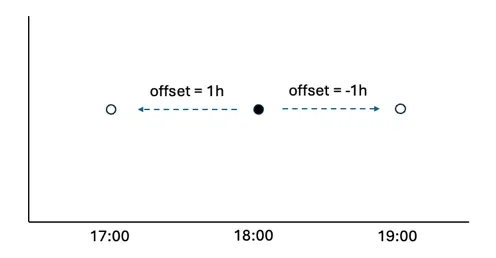
The offset can be defined in several ways. Positive values shift data to an earlier point in time:
-
number of milliseconds (3600000 = 1 hour)
-
an exact time definition (1s, 1h, 7d etc.) — see section 2.2 Values can be both positive and negative.
-
A time expression in hh:mm or hh:mm:ss. For example, to correct a value that is 2minutes and 14 secs slow you would use -00:02:14
-
java-style durations and periods, e.g. P1D for calendar day, PT24H for exactly 24 hours
-
relative time expressions, like “2 hours ago” — see section 2.4.
Examples
Section titled “Examples”Retrieve value of tag at end of previous day:
"calc/TIMESHIFT(calc/TOTALISE2(constants/1, MONTH, BEGIN_MONTH,1d), **last moment of yesterday**)",Retrieve value of tag at end of previous day relative to another date
calc/TIMESHIFT(calc/TOTALISE2(constants/1, MONTH, BEGIN_MONTH, 1d), lastmoment of yesterday)"2.13.5 HIGHPASS
Section titled “2.13.5 HIGHPASS”The HIGHPASS function applies a filter to a timeseries that lets the high frequencies pass and filters out the low frequencies. The syntax for the HIGHPASS function is:
HIGHPASS(tag, cutoff)tag - any valid timeseries source - see section 2.2
cutoff - a value in second that defines the cutoff frequency. E.g. 3600 will allow peaks that occur up to an hour apart
2.13.5 LOWPASS
Section titled “2.13.5 LOWPASS”The LOWPASS function applies a filter to a timeseries that lets the high frequencies pass and filters out the low frequencies. The syntax for the LOWPASS function is:
LOWPASS(tag, cutoff)tag - any valid timeseries source – see section 2.2
cutoff - a value in seconds that defines the cutoff frequency. E.g. 3600 filter out peaks that occur less that an hour apart
2.14 Rounding Functions
Section titled “2.14 Rounding Functions”The Rounding functions all have the syntax
calc/function(tag, x)Where
tag - any valid timeseries source – see section 2.2
x - a value specifying the rounding operation as appropriate to the function and described in the following sections.
With the exception of the MROUND function, the value of “x” for the rounding operation can be positive or negative. A positive number is the number of places after the decimal point, a negative number is the number of places before the decimal point. I.e. a value of “-1” is equivalent to rounding to the nearest 10.
2.14.1 ROUND
Section titled “2.14.1 ROUND”The ROUND function rounds a number to a specified number of digits. It rounds up if the next digit is 5 or greater, and down otherwise. For example,
calc/ROUND(12.345, 2)would result in 12.35, while
calc/ROUND(12.344, 2)would result in 12.34.
2.14.2 ROUNDUP
Section titled “2.14.2 ROUNDUP”The ROUNDUP function always rounds a number up, away from zero, to the specified number of digits. For example,
calc/ROUNDUP(12.341, 2)would result in 12.35.
2.14.3 ROUNDDOWN
Section titled “2.14.3 ROUNDDOWN”The ROUNDDOWN function always rounds a number down, towards zero, to the specified number of digits. For example,
calc/ROUNDDOWN(12.349, 2)would result in 12.34.
2.14.4 MROUND
Section titled “2.14.4 MROUND”The MROUND function rounds a number to the nearest specified multiple. For example,
calc/MROUND(12.34, 0.5)would round to the nearest 0.5, resulting in 12.5.
2.14.5 FLOOR
Section titled “2.14.5 FLOOR”The FLOOR function rounds a number down to the nearest specified multiple. For example,
calc/FLOOR(12.34, 0.5)would round down to 12.
2.14.6 CEILING
Section titled “2.14.6 CEILING”The CEILING function rounds a number up to the nearest specified multiple. For example
calc/CEILING(12.34, 0.5)would round up to 12.5.
2.15 Date
Section titled “2.15 Date”2.15.1 EPOCH_MS: Epoch Milliseconds of raw point
Section titled “2.15.1 EPOCH_MS: Epoch Milliseconds of raw point”EPOCH_MS Returns number of milliseconds, since 1st January 1970, of each [raw]{.underline} point in the underlying series. For current and historical points it gets last timestamp of point before. i.e for interpolated data it will return the timestamp of the last raw point before.
The syntax for an EPOCH_MS function is:
calc/EPOCH_MS(tag)Examples
Section titled “Examples”Calculate the number of hours between now and the most recent point stored in the tag:
calc/DIV(SUB(date/CURRENT_EPOCH_MS, calc/EPOCH_MS(tag)),3600000)This calculation first subtracts the EPOCH_MS of the most recent point from the current time, which will return the number of milliseconds difference. This is then divided by 3,600,000, which is the number of milliseconds in an hour.
2.16 Other
Section titled “2.16 Other”2.16.1 POINTINTIME: Point in Time
Section titled “2.16.1 POINTINTIME: Point in Time”The Point In Time function returns that value of the source data at a specific point in time. It is only useful for dashboards and will result in a flat line in a trend. The syntax for POINTINTIME is:
POINTINTIME(a, timereference)a — any valid timeseries source — see section 2.2
timereference — an expression describing how far to shift the data back in time — see below for options
The timereference can be defined in several ways:
-
As an offset from now :
-
number of milliseconds (3600000 = 1 hour)
-
an exact time definition (-1s, -1h, -7d etc.) — see section 2.2
-
relative time expressions, like “2 hours ago” — see section 2.4.
-
-
As a point in time :
-
As a timestamp expression in hh:mm or hh:mm:ss. E.g. 00:00 for midnight this morning
-
relative time expressions, like “last moment of yesterday” — see section 2.4.
-
Examples
Section titled “Examples”To return the value of a tag at 23:59:59.999 the previous day, the POINTINTTIME syntax is:
POINTINTIME(tag, last moment of yesterday)Return the value of a tag 2 hours ago:
POINTINTIME(tag, -2h)2.17 Dates Historian
Section titled “2.17 Dates Historian”As of build version ei-v6.71.6 in October 2024 there is a new “Dates” historian that returns data about the date. This does not relate to the date of value in a timeseries, but the date as a reference point itself e.g. on the x-axis. For example, when trended the, functions will use the x-axis time. When used to provide a single value in a dashboard the functions will use either “now” in Live Mode or the last point in the requested time window. The available functions in the dates historian are:
| Function | Definition |
|---|---|
| dates/CURRENT_EPOCH_MS | Return wall clock time in epoch ms. The returned units are “epoch ms”. |
| dates/DAY | Return number of day in month. Points are returned at midnight of the configured timezone. |
| dates/DAY_OF_MONTH | Return number of day in month. Points are returned at midnight of the configured timezone. |
| dates/DAY_OF_MONTH_UTC | Return number of day in month. Points are returned at midnight UTC. |
| dates/DAY_OF_WEEK | Return number of day in week. Monday is 1, and Sunday is 7. Points are returned at midnight of the configured timezone. |
| dates/DAY_OF_WEEK_UTC | Return number of day in week. Monday is 1, and Sunday is 7. Points are returned at midnight UTC. |
| dates/DAY_OF_YEAR | Return number of day in year. Points are returned at midnight of the configured timezone. |
| dates/DAY_OF_YEAR_UTC | Return number of day in year. Points are returned at midnight UTC. |
| dates/DAY_UTC | Return number of day in month. Points are returned at midnight UTC. |
| dates/DAYS_IN_MONTH | Return number of days in month. |
| dates/IS_BEFORE_TODAY | Return 1 if given timestamp is before midnight of today. (i.e. the opposite of IS_TODAY) |
| dates/IS_TODAY | Return 1 if given timestamp is today. When trended this will always be zero until the time on the x-axis is today. |
| dates/MONTH | Return number of month in configured timezone. |
| dates/MONTH_UTC | Return number of month. Points are returned at midnight UTC. |
| dates/YEAR | Return number of year. Points are returned at midnight of the configured timezone. |
| dates/YEAR_UTC | Return number of year. Points are returned at midnight UTC. |
2.18 Signal Generator Historian (siggen)
Section titled “2.18 Signal Generator Historian (siggen)”The Signal Generator or “siggen” historian is built in and is useful for generating example timeseries or for modifying other timeseries (for example the saw wave can be used to convert a daily forecast into a ramp showing the forecast to that point in the day).
The syntax is (without the spaces):
function amplitude +/- y-offset @ period +/- x-offset (in milliseconds)e.g. sin10-30@600-3600000 — sinewave of amplitude -10 to 10; offset by
-30 (i.e. between -40 and -20); with a period of 600 seconds; offset by
-3600000 milliseconds (1 hr)
The function will complete one full cycle within the period.
Function supported are:
-
sin (sine)
-
cos (cosine)
-
saw (saw wave) — useful to modify daily values
-
sq (square wave) — useful as an on/off signal
-
sc (S-curve)
-
rand (random) — repeatable random number