

Hierarchy Diagram
Some pages in the BSP may display a hierarchy visualization (a diagram similar to a flowchart or organisational chart) that presents the relationships between elements of the barrier model in a structured, expandable format. This provides an alternative way of navigating the barrier hierarchy to the sunburst or hierarchical table and may be better suited to users who prefer a more linear, top-down view of the model.
Structure
Section titled “Structure”The hierarchy visualisation starts at the top level of the barrier model for the current page context. For example, on an area page the first node displayed will typically be the barrier function, equivalent to the inner ring of the sunburst, excluding the area itself at the centre. Each node can be expanded to reveal the elements beneath it, branching downward through the hierarchy.
The structure follows the same relationships that are represented in the knowledge graph, meaning the connections shown in the hierarchy visualisation are consistent with what you would see in the sunburst or hierarchical table for the same area.

Features
Section titled “Features”Expanding nodes
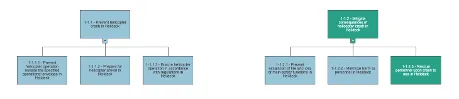
Clicking on a node expands it to reveal the related barriers or elements beneath it in the hierarchy. This allows users to explore the model at their own pace, opening only the branches they are interested in rather than viewing the full hierarchy at once.
Colour coding
Each node in the visualisation is colour-coded in line with the standard status scale, allowing users to identify impaired elements at a glance as they navigate through the hierarchy. A node showing amber or red can be expanded to trace the impairment down to the specific element causing it.
Common Menu access
The Common Menu can typically be accessed from nodes within the hierarchy visualisation, providing the full contextual detail behind the current status of that element, including active impairments and links to source records. For a full description of the Common Menu, see Common Menu Section.
When to use the hierarchy visualisation
Section titled “When to use the hierarchy visualisation”The hierarchy visualisation, the sunburst, and the hierarchical table all represent the same underlying data from different perspectives. The most appropriate view will depend on the task at hand and personal preference:
The sunburst gives the broadest simultaneous view of the full barrier model for an area, making it useful for a quick overall assessment.
The hierarchical table is better suited to users who want to scan and filter data in a structured list format. The hierarchy visualisation is well suited to tracing a specific path through the barrier model step by step, particularly where the relationships between levels are the focus rather than the overall status picture.